n-Track Frequently Asked Questions
FAQ Index | Show Topics Only
11. Using 3rd party plugins and Rewire with n-Track
- How do I ReWire Ableton Live with n-Track?
Using Ableton Live, you can integrate audio loops and samples into your n-Track projects. This is done by ReWiring Ableton Live 2 or later with n-Track.
- Install Ableton Live on your computer.
- If you have not used Ableton Live yet, please launch Live so that it can install its ReWire engine in your system.
- Quit Ableton Live.
- Launch n-Track.
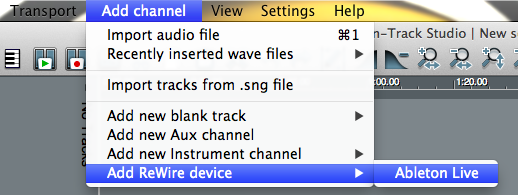
- Go to the n-Track "Add Channel" menu, select "Add RewireDevice" menu, and select "Ableton Live".
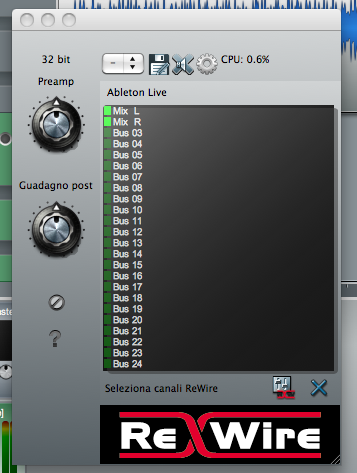
- Activate the ReWire channels in the n-Track ReWire menu.
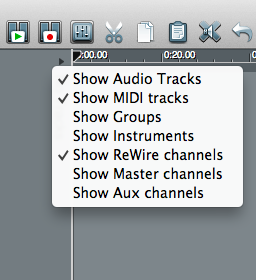
- To show ReWire Channel in n-Track timeline, select the arrow on top left corner of the n-Track timeline and check "Show Rewire channels".
- Launch Ableton Live outside n-Track.
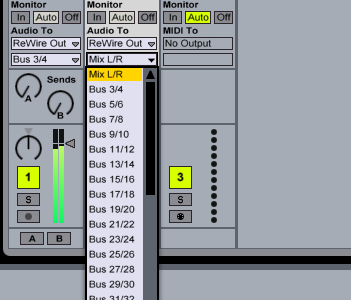
- Select the desired ReWire bus in Ableton Live's output menu.
Notes:
- Ableton Live is now in ReWire Slave mode; n-Track is the ReWire Master.
- To disconnect the ReWire connection you must always quit Ableton Live first.
FAQ Index
Support request |
n-Track Forum
© 2026 n-Track S.r.l. | VAT ID IT15290211000
 n-Track